
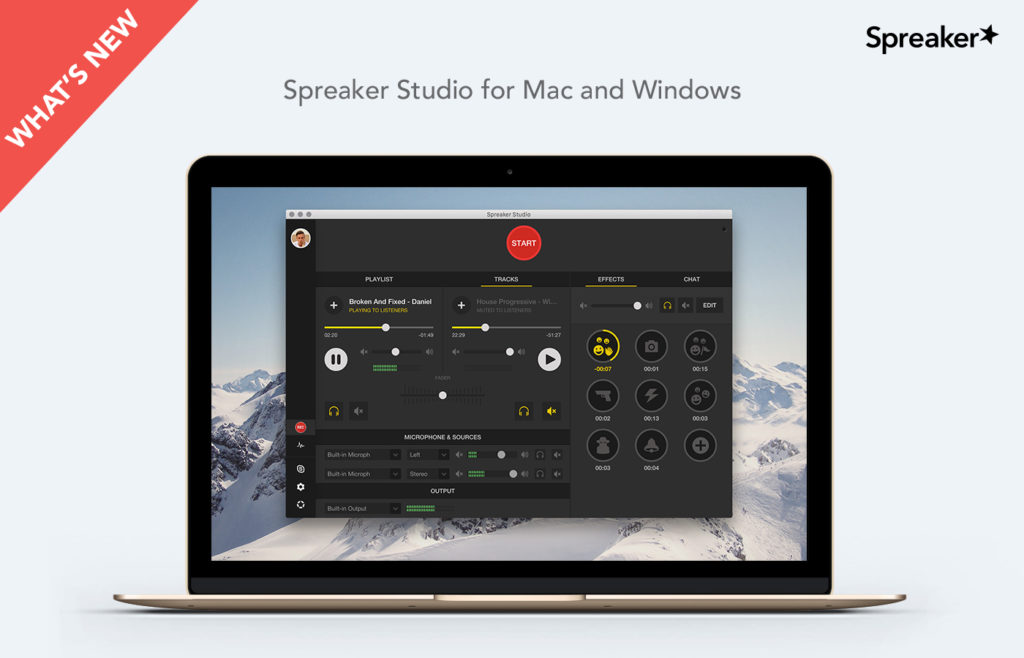

About one month ago, when we released the first version of Spreaker Studio for Mac and Windows, we got a lot of downloads and received a ton of feedback that helped us develop the new release we’re introducing to you today.
Broadcasting with Spreaker Studio for Mac and Windows will never be the same!
Update: Listen to this Spreaker Live Shows 39 min episode for a complete audio explanation of all the features of Spreaker Studio for Desktop on Mac/Windows:
Let’s go into details and see what’s new in this release.
What’s new section
We’ve introduced this section to help you discover new features in the app. If you want to stay up to speed, read up on this section anytime you receive a notification. If you don’t want to receive notifications, you can easily disable the automatic notification system in Preferences > General.

Volume management improvements
Starting from today you can better manage your volume, including setting your microphone and sources to the maximum level. You’ll also enjoy higher audio output quality that will prevent peaks and noise during the mixing phase. You’ll see this new feature under the section “Output Limiter” in Preferences > Console. Again, you’ll be able to disable it, but we strongly recommend you to keep it on.
Recordings and drafts
Now you can export your drafts to your laptop with the new export feature. You have two options: export drafts via the option you find towards the right of the drafts, or by dragging and dropping.
In addition, if you’ve paused a draft and now want to stop it, you can easily do so by right-clicking the playback button.
Live broadcasting
You can now save a local copy of your live broadcasts. This means that:
-you can go into post-production and then re-upload it again without having to download it after live broadcasting
-you’ll always have a complete local copy of the episode even if something goes wrong with your internet connection.
Also, from the episode page setup of your live show, you’ll be able to create a new show.

Playlist improvements
Lots of playlist improvements have been added, too: now you can delete an entire playlist and import new audio files in bulk by the dragging and dropping an entire folder from your computer. This will give you the chance to save even more time when setting up your podcast.

Microphones and Sources
Now you can configure your external sources even more easily: the new version supports channel selection giving you the ability to fine tune your dedicated input hardware. We’ve also worked on redesigning both volume sources and meter controls.

Accessibility
The entire application is now accessible using VoiceOver on Mac.
Ready to test out the new features? Let us know your feedback below.
Write for Us
Think you’ve got a fresh perspective that will challenge our readers to become better podcasters? We are always looking for authors who can deliver quality articles and blog posts.