
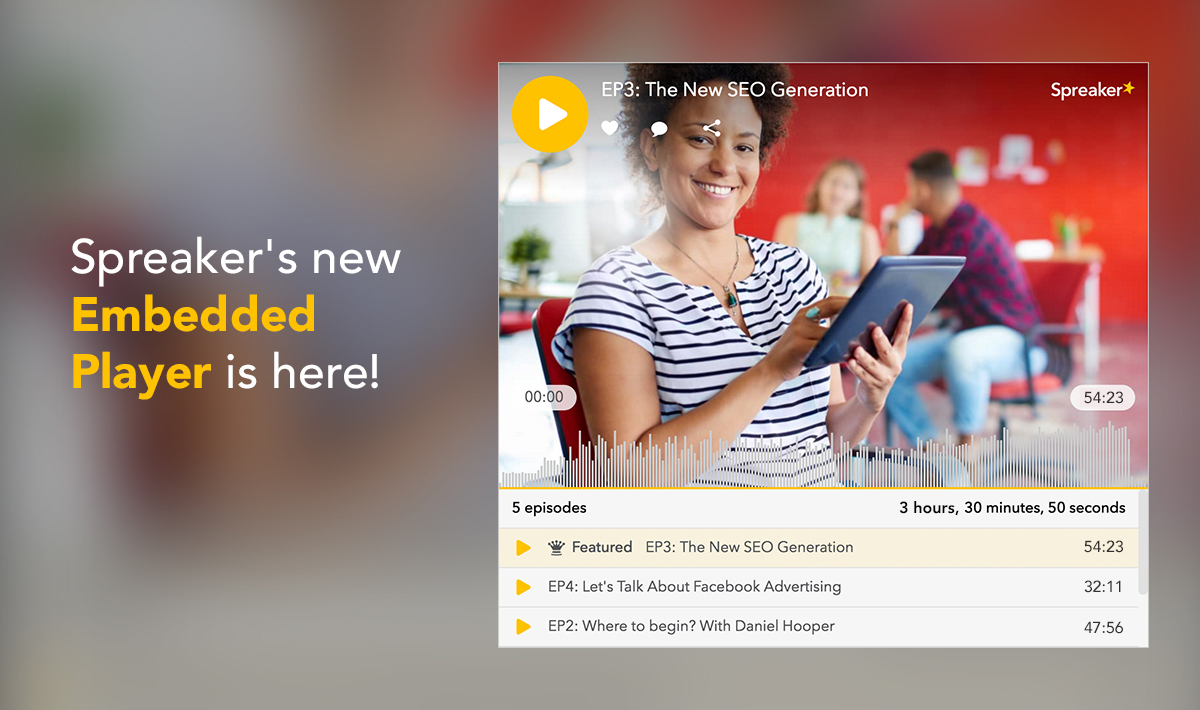
Don’t just tell listeners your story, show it to them, too!
Simply put, podcasting is storytelling via an audio medium. Not so simply put, podcasting is storytelling delivered via a number of various elements that also includes artwork, branding, and listening tools.
Now, with Spreaker’s newest embedded player, the marriage of all those elements comes together in one place, that’s efficient for you, as a producer, and convenient for your listeners. You can tell your story, and show it, too, with a full display of your episode or podcast artwork front and center, as well as a complete listing of your past podcast episodes. You’ll also be able to customize its size and color, and get to please your listeners’ eyes as well as their ears.
While you definitely need a reliable place to host and measure your content, (like, ahem, Spreaker), you may still want to keep your branding, distribution, and listeners coming through your homebase. By embedding a player to your website or blog, you’ll still be able to depend on Spreaker’s hosting capabilities and track your plays, downloads, and likes through your Spreaker analytics, but all the important stuff is happening on your website.
We know you get it, and many of you have already embedded Spreaker’s player in your home pages in the past. To update the player to this new version, you can replace the old code with the new code into your website.
High quality artwork is essential to your podcast; it’s a super important element that can convey your episode’s message or your podcast’s branding at just a glance. One look is all it takes to get listeners to tune in to what you have to say. (Need a refresher on how to create great artwork? Make a quick stop over here once you’ve finished reading this post).
And if you’ve worked hard on that artwork, then you of course you’ll want to show it off. Now, with Spreaker’s new player, listeners will see what you “look like” right away.

You’ll also have the extra benefit of adding appealing graphics to your page.
Prefer a more minimal approach to your embedded player? You can always choose not to display the the full photo.

Keep things matchy-matchy with the tone of your website choosing between the light and dark versions available.

With the new embedded player, customization is key, and you have the freedom to make it look the way you want it to. Adjust the height by plugging in the pixel number of your choice.
In the screenshot we added above, you can see the player at 600 px, but you can go smaller if you’d like:

Just as before, you can select a player dedicated to either a single episode or a podcast, it’s up to you. However, now, when you opt to embed a player dedicated to your podcast, you’ll also be adding a full listing of all its episodes, just under the play button. Listeners will be able to readily go back and forth from between what they want to listen to.

While it might feel a little different at first, we haven’t removed any of the features that you’ve come to depend on. Listeners can still like episodes and click on the chat bubble when they’ve got something to say.
Even better, they can still share your content to their friends to their social networks – extra distribution in a pinch!

And to find their favorite moments at a snap, listeners can toggle the slider.
Update (10/19/2016):
A quick update is now available that should make using it with WordPress sites even easier.
Those of you with self-hosted WordPress sites that have downloaded Spreaker’s plugin can continue to embed the player as you normally would, with the special WordPress-specific code we provide. That much hasn’t changed.
However, those of you with WordPress.com sites are getting something new! Now, you’ll be able to add the embedded player into your pages without needing a special plugin. You can embed the default version of the player directly into your site using simple code; just follow the pattern you see here:
[ embed height=”500″]https://www.spreaker.com/user/username[/embed]
And make sure there are no spaces in between the symbols and words. The URL included can be that of your profile page, podcast, or a specific episode.

And while we’re at it with the updates, just one more piece of news:
Soon Chrome will be rolling out its latest browser, version 54, with an update that will make managing multiple players easier on the ears from a listener’s point of view. Here’s how it works: when multiple players are embedded on a single page or throughout different tabs, they’ll be prevented from playing over each other. For example, as soon as you start playing one player, any other player that had been streaming in the meantime, whether it was located on the same page or in a different tab, will automatically pause.
Ready to play show and tell? Give us your feedback!
Write for Us
Think you’ve got a fresh perspective that will challenge our readers to become better podcasters? We are always looking for authors who can deliver quality articles and blog posts.